
How to Add Long-Term Memory to an AI Agent (2026 Guide)
What to store, where it lives, and the SDK and MCP code to connect it, including Claude Code, LangGraph and shared multi-agent memory.
Disclosure: Membase is our product, and the examples use it. The pattern works with any memory layer; where it helps, we show the Mem0 or LangGraph equivalent.
TL;DR: Long-term memory is a store outside the model. Your agent searches it before each model call and writes to it after each reply. You can connect it in two ways:
- SDK: your code decides when to read and write.
- MCP: the agent, or a tool like Claude Code, calls memory itself.
With Membase, both read the same memory, so several agents and your AI tools can share what each one learns. One running example carries through the whole guide: a team’s memory for a customer pilot with Acme.
Quick links
- Get an API key: Membase web app → Connect › Developer keys
- Python SDK: unibaseio-membase on PyPI · pip install unibaseio-membase
- TypeScript SDK: @unibaseio/membase on npm · npm install @unibaseio/membase
- CLI: @unibaseio/membase-cli on npm · npm install -g @unibaseio/membase-cli
- MCP server: setup guide · endpoint https://api.app.membase.ai/mcp-http
- Connect Claude Code, Cursor, Codex and ChatGPT: Connect your AI
- SDK reference: methods, REST routes and MCP tools
- Source and examples: github.com/unibaseio/membase-ai
- Videos: Membase SDK in 1 minute · Membase in Claude Code over MCP
- Docs: docs.membase.ai · Help: Discord
Before you start
- Python 3.10+ (or Node 18+). Local mode needs Python 3.12 or 3.13.
- An LLM API key. The examples use OpenAI; Anthropic and Ollama also work.
- A Membase account. Free in beta.
- About 15 minutes for Steps 3 to 7.
What long-term memory means for an agent
A model forgets everything once the session ends. Long-term memory is what carries over.
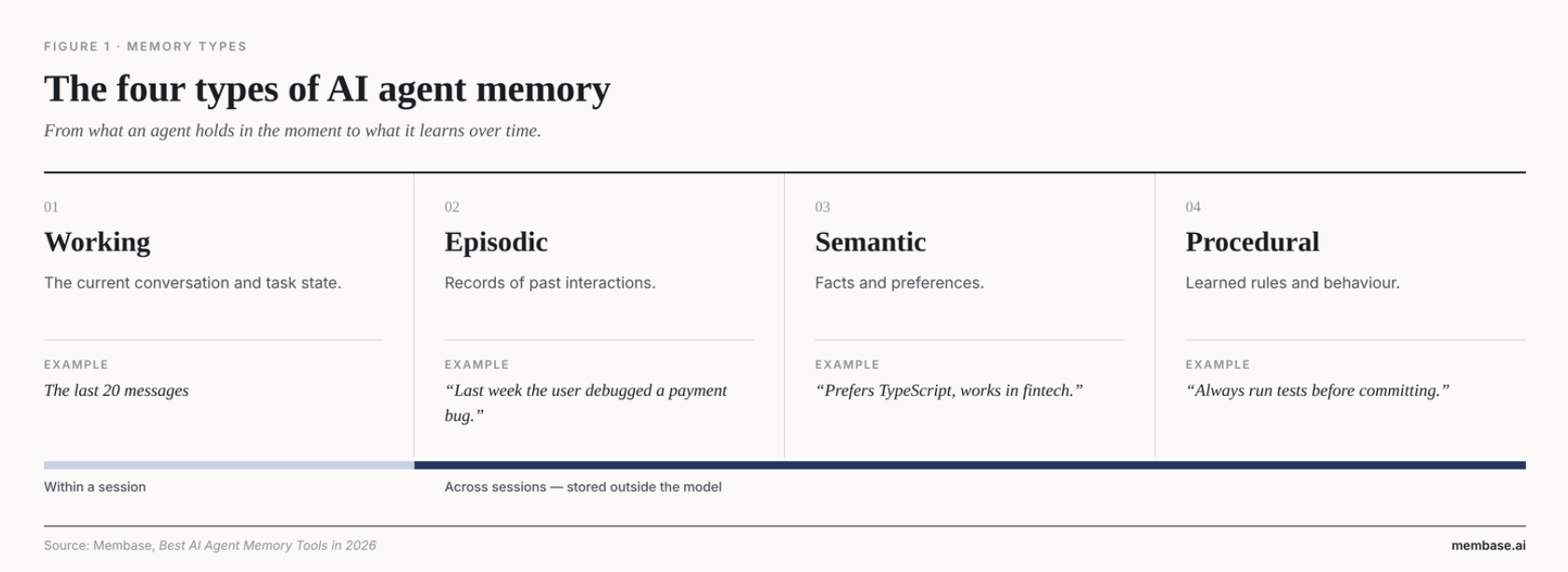
- Working memory: the current conversation and task, such as the last 20 messages. Lasts one session.
- Episodic memory: what happened before, such as “Last week the user debugged a payment bug.” Lasts across sessions.
- Semantic memory: facts and preferences, such as “Acme requires SSO via Okta.” Lasts across sessions.
- Procedural memory: learned rules, such as “Always run tests before committing.” Lasts across sessions.
Why not just use a bigger context window? Replaying the full history costs more on every call, and models are worse at using facts buried in the middle of long prompts (Liu et al., Lost in the Middle). A memory layer loads only what’s relevant. On LoCoMo, Membase answers from about 3× fewer tokens than the full history, and on LongMemEval_S about 11× fewer (Membase research).
Isn’t this just RAG? No. RAG retrieves shared, mostly static knowledge, such as your docs. Agent memory holds what the agent and its users have learned over time, scoped to a person or project and updated as facts change. Many agents use both.
The pattern: retrieve, reason, write back
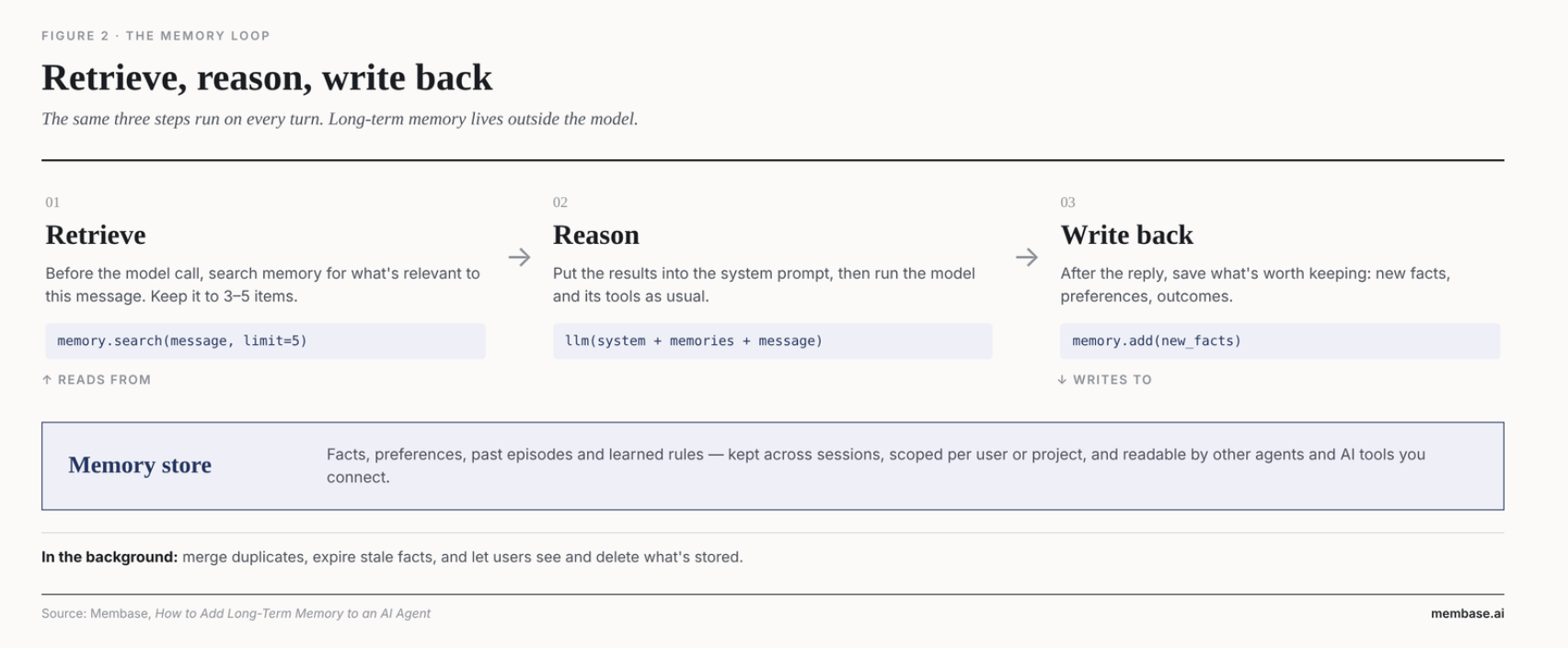
Step 1: Decide what to remember
Store:
- Stable facts (“Acme requires SSO via Okta”)
- Decisions and outcomes (“Week 1: 5 pilot users signed in”)
- Preferences and rules (“send quotes per seat”)
- Who asked for what (“Marcus Lee needs the DPA first”)
Don’t store:
- Every message verbatim
- Small talk and greetings
- Secrets, passwords and API keys
- Facts that expire in minutes
When in doubt, store less. The agent will act on whatever it remembers.
Step 2: Choose where memory lives
- Files the agent edits (MEMORY.md, Claude's memory tool, Spring AI AutoMemoryTools). Good for one agent on one machine. Hard to share, search or isolate per user.
- Your own database (pgvector, Qdrant, TiDB). Full control, but you build extraction, updates and isolation yourself.
- Your framework’s store (LangGraph + LangMem). Good if you’re already on LangGraph. Memory stays inside that framework.
- A cloud platform’s memory (AWS Bedrock AgentCore Memory, Google ADK). Good if you’re already on that cloud. Tied to one provider.
- A memory layer API (Mem0, Zep, Membase). The fastest way to production, at the cost of one more service.
Membase fits best when several agents and your AI tools need the same memory. For a full comparison of nine tools, see Best AI Agent Memory Tools in 2026.
SDK or MCP?
- SDK: your code decides when to read and write, on every turn. Best for your own app or agent in production. More code, but predictable.
- MCP: the agent or AI tool decides when to call memory. Best for Claude Code, Cursor, Codex and MCP-native agents. One command to set up, but the model may skip a lookup.
Most teams use both. The app writes memory through the SDK, and the team’s AI tools read it over MCP.
Step 3: Create a developer key
In the Membase web app, go to Connect › Developer keys and create a key. Each key has a level (for example Read & write: search the memory and add notes) and a reach (which memories it can use; here, only the Acme pilot memory).
export MEMBASE_API_KEY="mbk_..."
Step 4: Write memory with the SDK
Prefer to watch? Steps 3 to 5 in a one-minute video.
pip install unibaseio-membase # or: npm install @unibaseio/membase
from membase import Membase

client = Membase()  # reads MEMBASE_API_KEY

doc = client.add(
    "Follow-up with Acme: Marcus confirmed Okta SAML is the only SSO they will accept.",
    container="mv-e76bd056393a",       # the Acme pilot memory
    custom_id="acme-followup-0927",    # running this again won't add a second copy
)
print("added:", doc["document_id"], doc["status"])
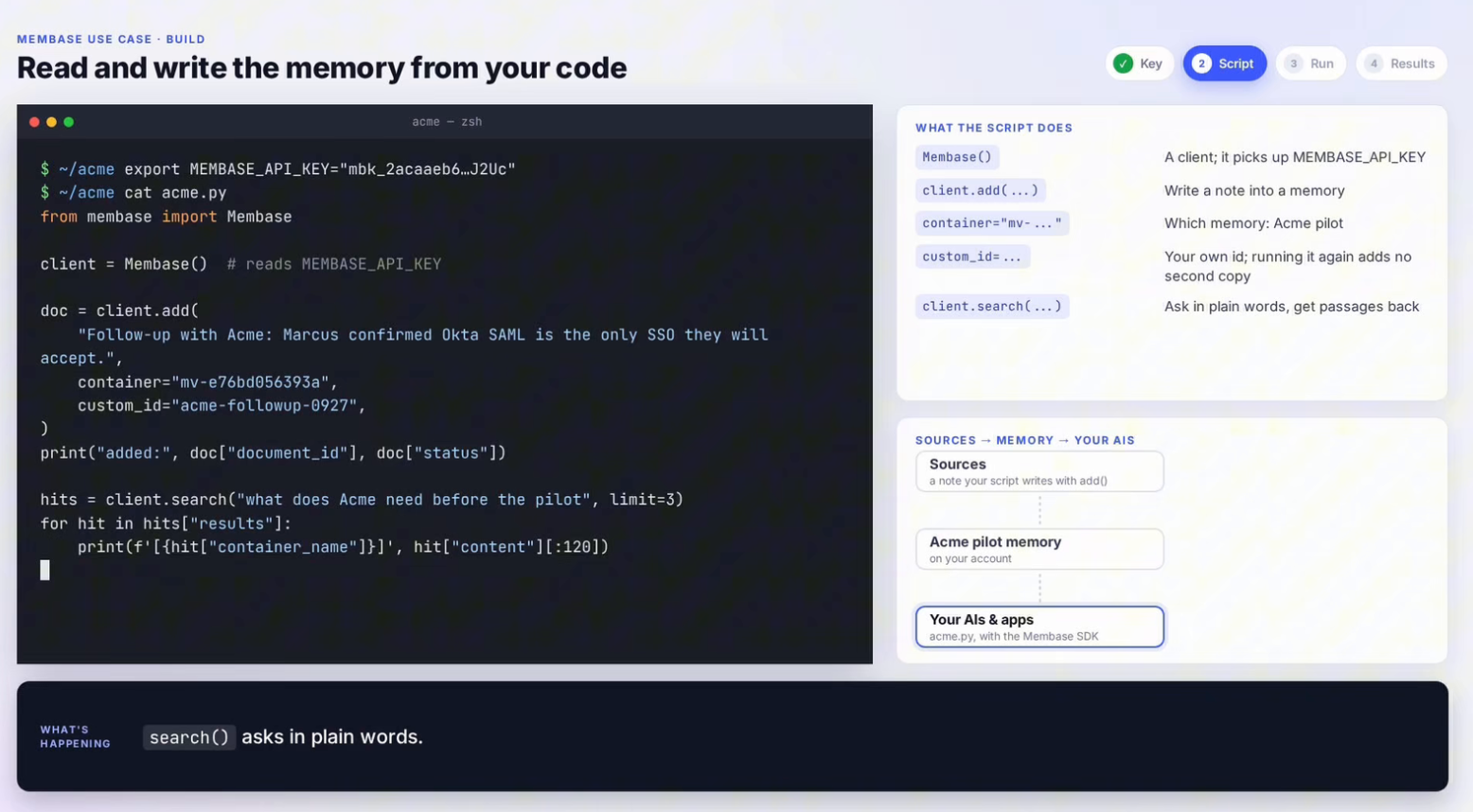
add() returns queued. The note is saved, and Membase learns from it in the background, so it becomes searchable shortly afterwards. custom_id makes writes safe to retry. To find a container's ID, call client.containers.list().
Step 5: Search memory before each model call
hits = client.search("what does Acme need before the pilot", limit=3)
for hit in hits["results"]:
    print(f'[{hit["container_name"]}]', hit["content"][:120])
Each result comes back with the memory it came from and the source file it was learned from.
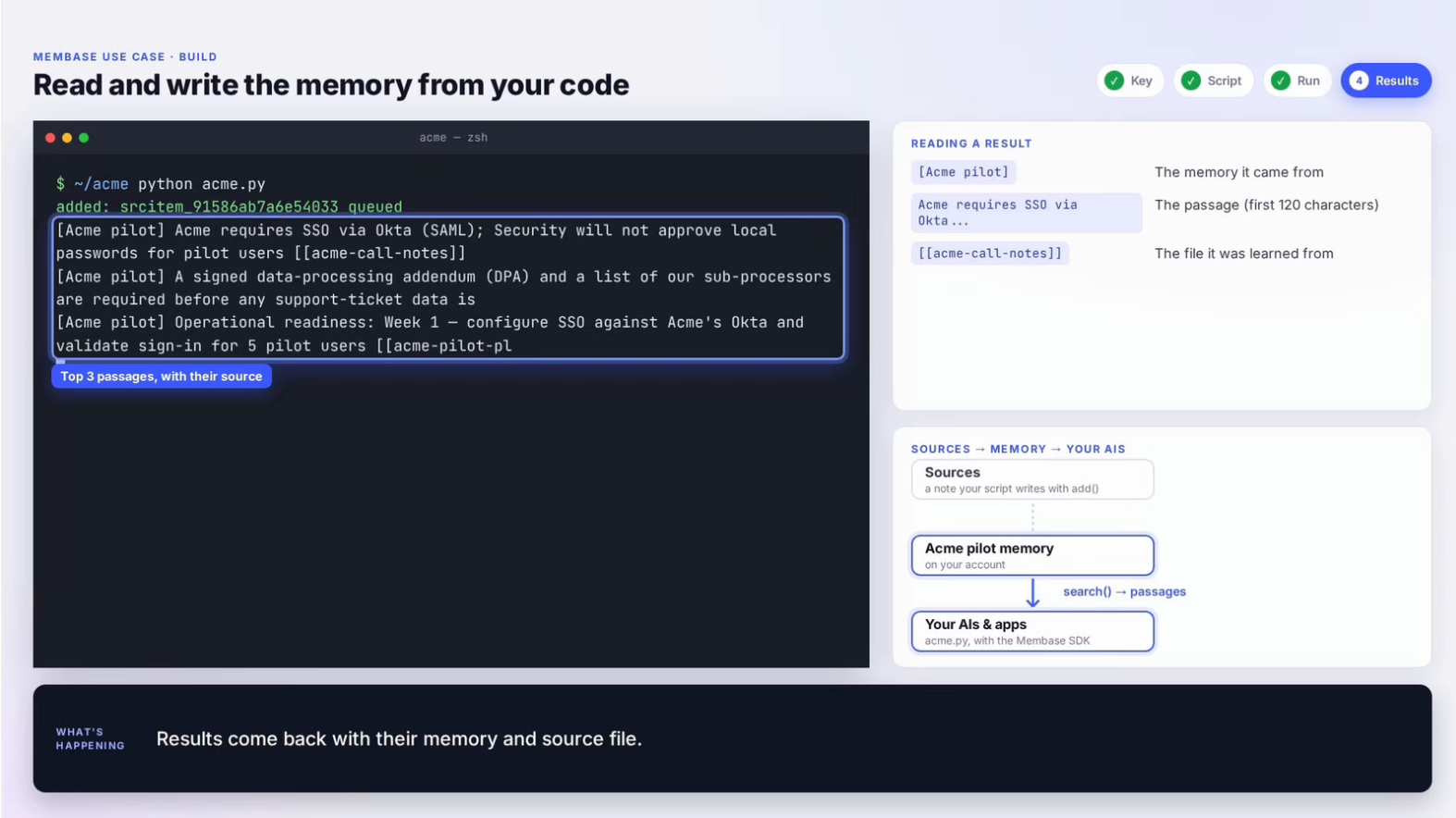
Keep limit small. Three to five relevant passages beat twenty loosely related ones, both for answer quality and for cost.
Step 6: Put it in the loop
With the OpenAI SDK:
from membase import Membase
from openai import OpenAI

mem, llm = Membase(), OpenAI()
ACME = "mv-..."  # your container ID

def recall(message: str) -> str:
    hits = mem.search(message, container=ACME, limit=3)
    return "\n".join(h["content"] for h in hits["results"]) or "(nothing yet)"

EXTRACT = ("From this exchange, list new long-term facts worth remembering, one per line. "
           "Skip small talk and anything temporary. Reply NONE if there is nothing.")

def remember(user_msg: str, reply: str, turn_id: str) -> None:
    facts = llm.chat.completions.create(
        model="gpt-4o-mini",
        messages=[{"role": "system", "content": EXTRACT},
                  {"role": "user", "content": f"User: {user_msg}\nAssistant: {reply}"}],
    ).choices[0].message.content.strip()
    if facts != "NONE":
        mem.add(facts, container=ACME, custom_id=f"turn-{turn_id}")

def chat(user_msg: str, history: list, turn_id: str) -> str:
    system = f"You are the Acme pilot assistant.\nWhat you know from earlier sessions:\n{recall(user_msg)}"
    reply = llm.chat.completions.create(
        model="gpt-4o-mini",
        messages=[{"role": "system", "content": system}, *history,
                  {"role": "user", "content": user_msg}],
    ).choices[0].message.content
    remember(user_msg, reply, turn_id)   # in production, run this after the reply is sent
    return reply
With LangGraph, the same two calls go inside a node. LangGraph's checkpointer keeps the current thread; Membase keeps what should outlast it.
from typing import Annotated, TypedDict
from langchain_openai import ChatOpenAI
from langgraph.graph import StateGraph, START, END
from langgraph.graph.message import add_messages

model = ChatOpenAI(model="gpt-4o-mini")

class State(TypedDict):
    messages: Annotated[list, add_messages]

def chatbot(state: State):
    question = state["messages"][-1].content
    system = ("system", f"What you know from earlier sessions:\n{recall(question)}")
    reply = model.invoke([system, *state["messages"]])
    remember(question, reply.content, turn_id=str(len(state["messages"])))
    return {"messages": [reply]}

graph = StateGraph(State)
graph.add_node("chatbot", chatbot)
graph.add_edge(START, "chatbot")
graph.add_edge("chatbot", END)
app = graph.compile()
Coming from Mem0? The calls map almost one to one:
- Membase search(q, container=…, limit=…) → Mem0 search(query, user_id=…)
- Membase add(text, container=…, custom_id=…) → Mem0 add(messages, user_id=…)
- A Membase key’s reach (which memories it can use) → Mem0 user_id / agent_id
Step 7: Give your AI tools the same memory over MCP
Prefer to watch? This step in a one-minute video.
This is the step most guides skip. With MCP, Claude Code answers from the same memory your app writes to. One command adds it, scoped to the current project folder:
claude mcp add --transport http --scope local membase \
  https://api.app.membase.ai/mcp-http \
  --header "Authorization: Bearer ${MEMBASE_API_KEY}"
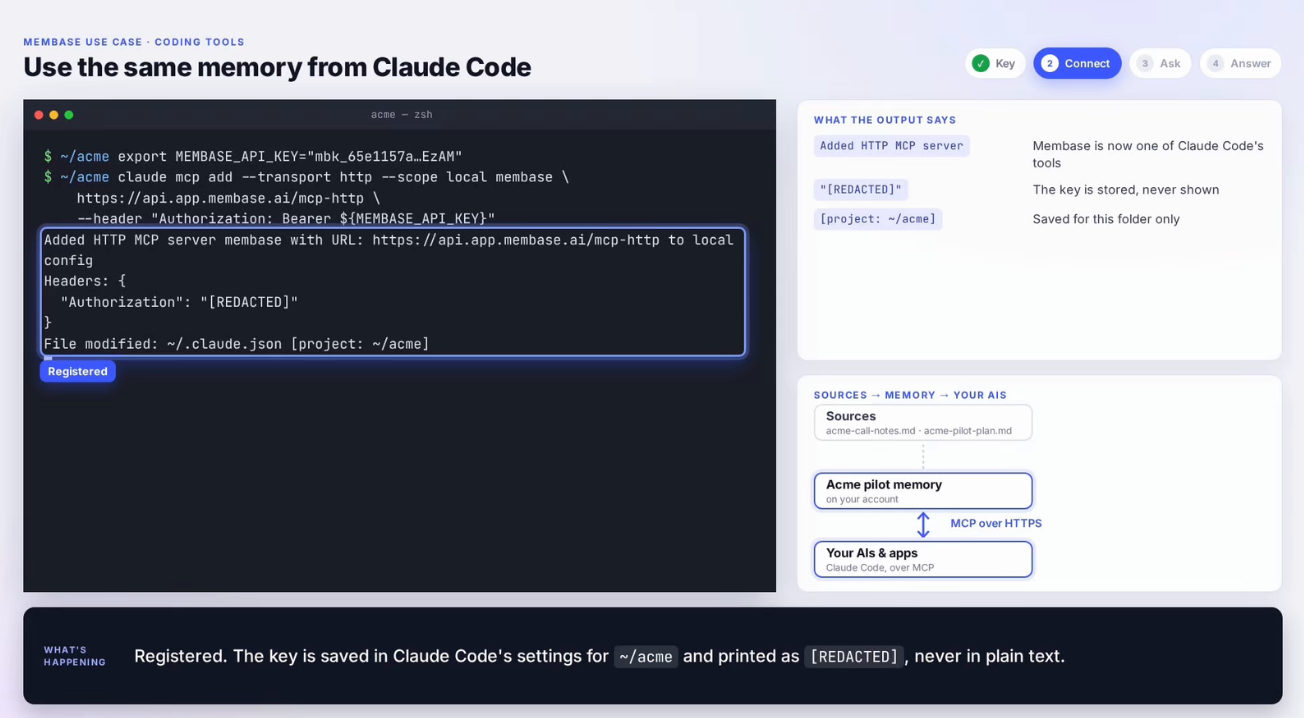
The key is saved in Claude Code’s settings for that folder and printed as [REDACTED], never in plain text. Now ask:
claude -p "What does Acme need before the pilot? Keep it short." \
  --allowedTools mcp__membase
Claude Code calls Membase’s tools over MCP, searches only the Acme pilot memory the key allows, and traces every point to its source file:
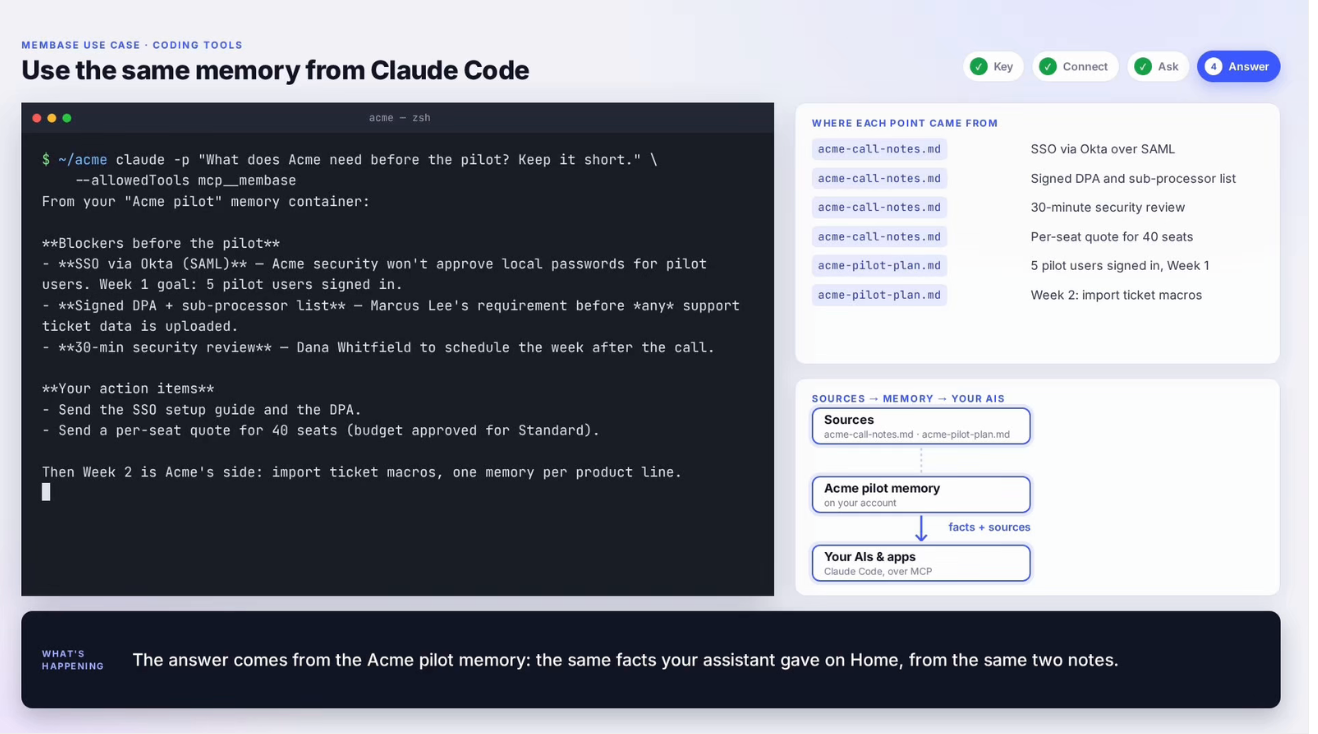
Cursor, Codex and any other MCP client connect the same way (setup guide). Agent frameworks that support remote MCP servers can use the same URL and header, letting the agent decide when to search and add instead of the code in Step 6.
Step 8: Share memory between agents
Agents usually work in teams: a planner and an executor, or a support bot and the engineers’ coding tools. Each should build on what the others learned.
- One memory, several readers. Point every agent at the same container. The support assistant writes the Acme call notes with the SDK, and Claude Code answers from them over MCP, exactly as in Step 7.
- Separate keys per agent. Give each agent its own key with only the level and reach it needs. Revoking one agent’s access doesn’t touch the others.
- Learn from past runs. In local mode, membase --local agent ingest trace.json --agent coder stores what an agent did, and membase --local agent search "fix flaky deploy" --agent coder finds how a similar problem was solved before.
Step 9: Scope memory per person and project
- Projects: give each project or client its own memory (container), so Acme notes never show up in another client’s answers.
- People: a Membase key belongs to one person and reaches only their own memories. To serve many end users, each user connects their own account, through MCP consent or their own key. Mem0 and Zep use a user_id parameter instead. Either way, take identity from your auth layer, never from client input.
- Test it: write a memory with one key, then search with another. Nothing should come back.
Step 10: Maintain and measure
- Remove access cleanly: claude mcp remove membase, or revoke the key under Connect.
- Forget on request: memories.forget(id, confirm=True) and documents.delete(id, confirm=True) need a key with Full access. Let users see and remove what's stored about them.
- Replace stale facts: when something changes, write the new fact with a date. Don’t let old and new versions sit side by side.
- Write in the background: saving memory should never delay the reply.
- Guard against memory poisoning: don’t store instructions from web pages or tool output as rules.
- Measure it: track how often retrieved passages are used in answers, which questions users stop repeating, and tokens per answer. Re-run a fixed set of test questions after every change.
Limitations to plan for
- Errors compound. A wrong fact gets retrieved again and again. Keep sources attached so you can trace and fix it.
- Facts drift. Prices, owners and requirements change. Without dates and replacement, the agent mixes old and new.
- Cost and latency. Each turn adds a search, and write-back adds a model call. Keep limit small and write asynchronously.
- Privacy. Memory holds personal and customer data. Scope it tightly and make deletion easy.
- Benchmarks aren’t your data. Vendor scores, including ours, use different setups. Test on your own questions.
Common mistakes
- Saving every message. Extract facts first (Step 6).
- Retrieving 20+ passages each turn. Cap it at 3–5.
- One key that reaches every memory. Limit each key to what that app or person needs.
- Taking user identity from the client. Take it from your auth layer.
- Writes that duplicate on retry. Pass custom_id.
- Each agent with its own isolated memory. Share one memory across agents (Step 8).
- Memory only inside your app. Connect your AI tools over MCP (Step 7).
Sources
- Membase SDK reference
- Connect Claude Code and other MCP clients
- Multi-user isolation in Membase
- Membase SDK on GitHub
- Membase research: benchmarks and token use
- Liu et al., Lost in the Middle (2023)
- Atlan: How to implement long-term memory in AI agents
- Mem0: How to create AI agents with long-term memory
- PingCAP: AI agent memory architecture
- Spring AI: AutoMemoryTools
- centron: Build AI agents with long-term memory using LangGraph and Mem0